
Products
A product is what a customer buys on a contract line: a parking product with pricing, a type, duration rules and optional links to facilities or zones.
Product List
Section titled “Product List”The overview of all products, the entry point to the Product Card, and the lookup used when contract lines are created. Shows No., Description, Product Type, and price and status information.
Product Card
Section titled “Product Card”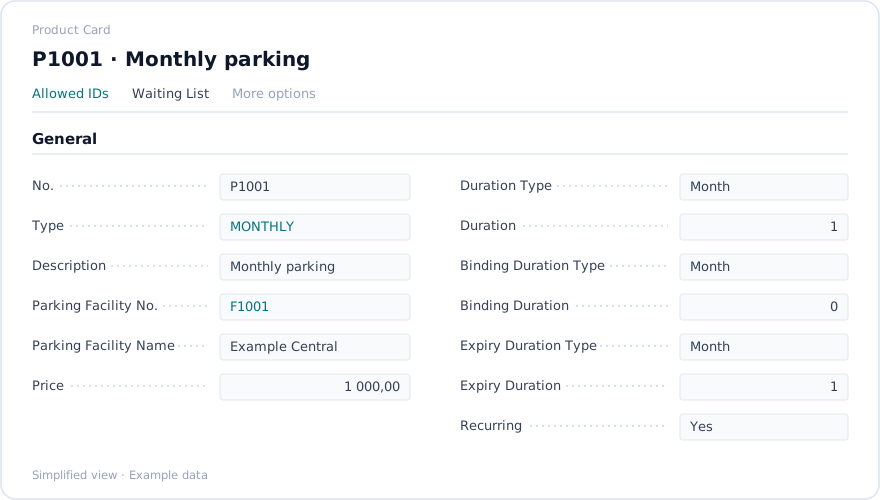
| Field or group | What it is for |
|---|---|
| No. | Product number. Required. |
| Description | Product name. Required. Shown on contract lines and documents. |
| Type | Classification, selected from the Product Type List. |
| Price | Base price for the product. |
| Duration Type, Duration | The unit and length of the product’s duration. |
| Binding Duration Type, Binding Duration | The unit and length of the binding period. |
| Expiry Duration Type, Expiry Duration | The unit and length used for expiry. |
| Facility and zone links | Where the product can be used. Optional restrictions. |
| Deferral Template Code | Revenue recognition template, if deferred revenue applies. |
| Webshop and visibility flags | Whether the product appears in the webshop. |
| Picture | The product image, managed in the Product Picture FactBox. |
From the card you can open the related lists: Allowed IDs, Waiting List and Campaign assignments.
Prerequisite. Product types must be defined first. Parking facilities and zones may be required depending on the product setup.
Product types
Section titled “Product types”Product Type List holds the types used to classify products: a Code and a Description, both required.
Allowed IDs
Section titled “Allowed IDs”Product Allowed ID List defines which identifiers are allowed for a product, for example vehicle registration patterns or access IDs. Each entry is a product number with an allowed ID or pattern.
Campaigns
Section titled “Campaigns”A campaign promotes selected products for a limited period. Work through Product Campaign List → Product Campaign Card → Product Campaign Product subpage.
| Field | What it is for |
|---|---|
| Campaign No., Name | Identification. Required. |
| Start Date, End Date | Validity period. Required for time-bound campaigns. |
| Status, Description | Campaign state and notes. |
The Product Campaign Product subpage assigns the products that belong to the campaign. Campaigns influence product availability or pricing on contracts and in the webshop.
Waiting list
Section titled “Waiting list”Product Waiting List tracks customers waiting for a product that is currently unavailable, for example a space type that is full. Entries carry customer, product, registration date, priority, status and notes. The list is reached from the Product Card or the customer, and is used operationally when a space becomes available.