
Periods, ledger and logs
These pages are opened from a contract line or from the Contract card. Use them to review billing periods, ledger entries and change history. Contract Line Periods also has actions for period and invoice processing.
Contract Line Periods
Section titled “Contract Line Periods”The billing periods that belong to one or more contract lines, sorted by Contract No., Line No., Period Start and Period End. Used for inquiry, and as the selection list when a line is cancelled on a specific period end date.
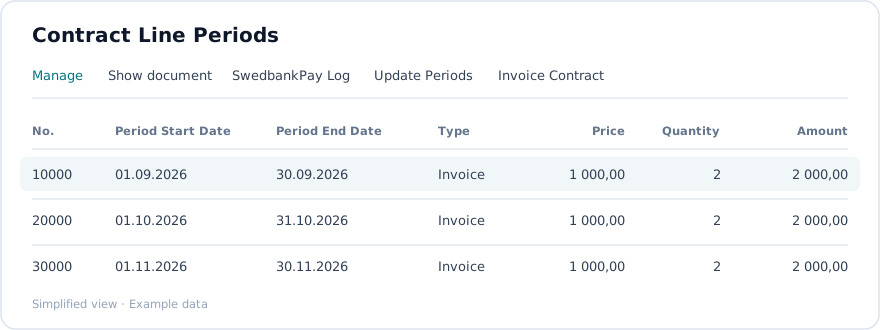
The default list shows these columns. Contract No. and Contract Line No. are available as filters.
| Field | What it is for |
|---|---|
| No. | Number shown for the period entry. |
| Period Start Date | Start of the billing period. |
| Period End Date | End of the billing period. This is the date used when a period is selected for cancellation. |
| Type | Period type, such as Invoice. |
| Document No. | Document number recorded for the period. |
| Invoice Line Amount | Invoice line amount recorded for the period. |
| Frozen | Checkbox showing whether the period is frozen. |
| Invoiced | Whether the period has been invoiced, shown as Yes when applicable. |
| Price | Unit price for the period. |
| Quantity | Quantity for the period. |
| Line Discount % | Discount percentage for the period. |
| Amount | Period amount excluding VAT. |
| VAT % | VAT percentage for the period. |
| Amount Including VAT | Period amount including VAT. |
The page opens from the Periods action on a contract line or on the Contract card, and as a modal selection page during cancellation. Its action bar includes Manage, Show document, SwedbankPay Log, Update Periods and Invoice Contract.
Contract Line Ledger
Section titled “Contract Line Ledger”The historical view of posted or calculated ledger entries for contract lines: period dates, amounts and posting information, sorted the same way as the periods. Use it for auditing and reconciliation. Opens from the Ledger action on a contract line and complements the Periods page with the posted view.
Contract Line Status Log
Section titled “Contract Line Status Log”The audit trail of every status change on a contract line: old status, new status, date and time, and user. Read-only. Opens from the Status Log action on a contract line, filtered to that line.
Quantity Log
Section titled “Quantity Log”The history of quantity changes on a contract line: date, old and new quantity, user, and the reason if one was captured. Opens from the assist-edit button on the Quantity field.
Contract Line Period Correction
Section titled “Contract Line Period Correction”A temporary list used to correct or adjust period data.