
Contract lines
Every product a customer buys is a contract line. Lines are managed in the Contract Lines subpage on the Contract card, and the same list is available stand-alone as Contract Line List across all contracts.
Fields
Section titled “Fields”The fields visible by default on the Contract card subpage:
| Field | What it is for | Rules |
|---|---|---|
| No. | Product number | Select the parking product. Editable only when the line rules allow it. |
| Product Type | Type of the product | Filled from the product. Not editable. |
| Description | Line description | Taken from the product; can be adjusted. |
| Price | Unit price | Editable according to the line rules. |
| Quantity | Number of units | Editable according to the line rules. The assist-edit button opens the Quantity Log. |
| Amount | Price × Quantity | Calculated, or editable according to the line rules. |
| VAT % | VAT percentage | From the product and VAT setup. |
| Amount Including VAT | Amount including VAT | Calculated. |
| Line Discount % | Discount on the line | Enter if a discount applies. |
| Line Amount | Amount after discount | Calculated. |
| Line Amount Including VAT | Final line amount including VAT | Calculated. |
| From Date | Start of the contractual period | |
| To Date | End of the contractual period | Editable only when the line rules allow it. |
| Recurring | Subscription-style line | Editable according to the line rules. |
| Status | Current status of the line | Controls what can be edited and which actions apply. See below. |
| Subscription No. | Linked subscription | Shown when applicable. |
| Payment Type | How the line is paid | Select the payment method. |
| Expiry Date | Calculated or set expiry date | Used by the cancellation logic. |
| Parking Facility No. | Linked parking facility | Select the facility the product relates to. |
| Parking Facility Name | Name of the facility | Filled automatically. |
Hidden and advanced fields, shown when the page is personalised or in certain contexts, include Align with Month, Duration Type, Duration, Product From Date, Product To Date, Binding Duration, Expiry Duration, Product Description, Deferral Template and Webshop Order ID.
Status
Section titled “Status”A new line has a blank status. Statuses include Activated, Cancelled and Expired. The status decides which fields can be edited and which actions are available. Lines with status Expired are shown greyed out so they are easy to tell apart.
Actions
Section titled “Actions”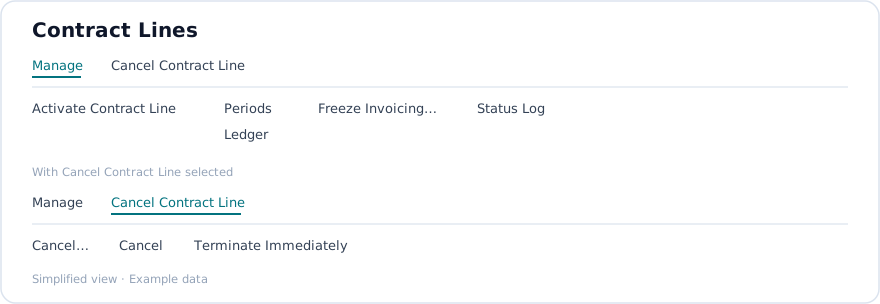
| Action | Group | What it does |
|---|---|---|
| Activate Contract Line | Manage | Activates the selected line or lines. |
| Cancel | Cancel Contract Line | Cancels according to the default expiry rules, after confirmation. |
| Cancel… | Cancel Contract Line | Opens a period selection dialog so you choose the exact period end date for the cancellation. |
| Terminate Immediately | Cancel Contract Line | Terminates the selected line or lines immediately, after confirmation. |
| Generate Remaining Periods | Manage | Available when the status is Cancelled. Creates any remaining periods that should still be invoiced. |
| Periods | Manage | Opens Contract Line Periods filtered to the line. Enabled when the line can contain period entries. |
| Ledger | Manage | Opens Contract Line Ledger filtered to the line. |
| Freeze Invoicing | Manage | Opens a dialog to freeze invoicing for selected periods. |
| Show Order Confirmation | Manage | Shows the order confirmation document, if one is attached to the line. |
| Status Log | Manage | Opens the Contract Line Status Log for the line. |
Cancelling a line
Section titled “Cancelling a line”There are three ways to end a line:
- Cancel applies the default expiry rules for the product. The line’s Expiry Date shows the result.
- Cancel… lets you pick the period whose end date becomes the cancellation date, from the line’s Contract Line Periods.
- Terminate Immediately ends the line at once.
After a cancellation, use Generate Remaining Periods if periods that should still be invoiced are missing.
Prerequisites
Section titled “Prerequisites”A contract header must exist. Products, and where relevant parking facilities, must be set up.