
Contracts
A contract holds a customer’s parking agreement: the header with customer details and fees, and the contract lines for each product.
Contract List
Section titled “Contract List”The Contract List is the overview of all contracts. It is not editable; all changes are made on the Contract card. Open a contract by drilling down on No..
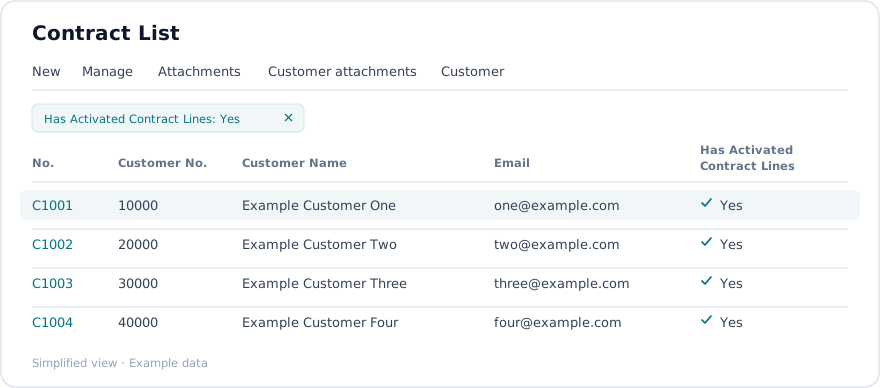
| Field | What it is for |
|---|---|
| No. | Contract number. Drill down to open the card. |
| Customer No. | The linked customer. Filterable. |
| Customer Name | Useful for searching. |
| Primary email. | |
| Billing Email | Billing email. |
| Has Activated Contract Lines | Whether the contract has active lines. |
Default filter. When the list is opened without a customer filter, it shows only contracts where Has Activated Contract Lines is true. Remove that filter to see contracts with no active lines.
| Action | What it does |
|---|---|
| Attachments | Opens the attachments for the selected contract. |
| Customer attachments | Opens the attachments for the related customer. |
| Customer | Opens the Customer Card for the selected contract’s customer. |
Contract card
Section titled “Contract card”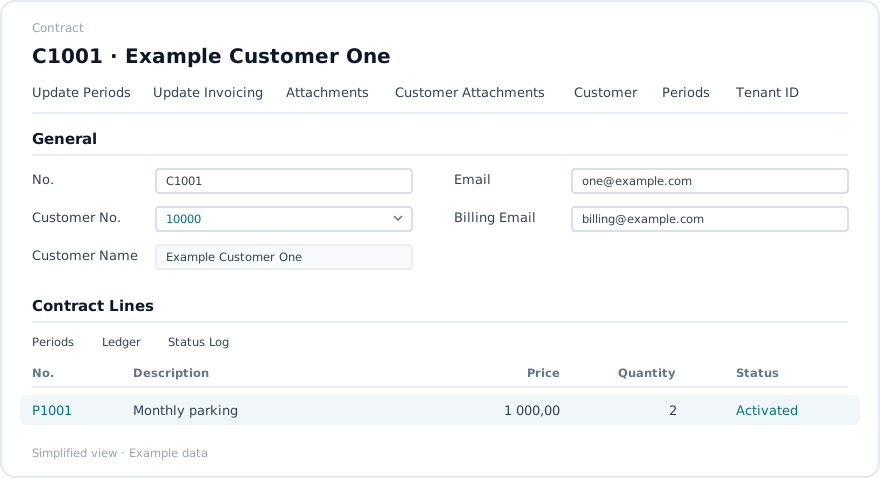
General FastTab
Section titled “General FastTab”| Field | What it is for | Rules |
|---|---|---|
| No. | Unique contract number | Assigned from the number series or entered manually. Required. |
| Customer No. | Links the contract to a customer | Required. Changing the customer refreshes the related information. |
| Customer Name | Name of the customer | Filled from the customer. Usually read-only. |
| Address, Address 2, Post Code, City, Phone No. | Customer address and phone | Copied from the customer. |
| Primary email address | Used for communication. Can be maintained on the contract. | |
| Billing Email | Email address used for invoices | May differ from the primary email. Copied or overridden as needed. |
| Administration Fee | Whether the administration fee is enabled | Switch on if the fee applies to this contract. |
| Invoice Fee | Whether the invoice fee is enabled | Switch on if the fee applies to this contract. |
| Your Reference | The customer’s own reference | Free text. |
Contract Lines subpage
Section titled “Contract Lines subpage”All line-level fields, statuses, periods, quantities and actions are managed in the embedded Contract Lines subpage. See Contract lines.
Actions
Section titled “Actions”These actions are available on the Contract card’s action bar.
| Action | What it does |
|---|---|
| Update Periods | Runs the contract update job for this contract as of today, regenerating or refreshing its billing periods. |
| Update Invoicing | Runs the invoicing job for this contract as of today, creating or updating invoice-related data. |
| Attachments | Opens the attachment dialog for the contract, to add or view files and images. |
| Customer Attachments | Opens the attachment dialog for the related customer. |
| Periods | Opens Contract Line Periods filtered to this contract. |
| Customer | Opens the standard Customer Card for the contract’s customer. |
Prerequisites
Section titled “Prerequisites”- The customer must already exist.
- Products, and where relevant parking facilities and zones, should be set up before lines are added.
- The number series for contracts must be configured.
Closing the page
Section titled “Closing the page”If any contract line still has a blank status, the page asks for confirmation before it closes.